
I Made a Music Video in a Morning. Here's How.

I had a song.
By lunch I had a finished music video: 24 shots, three minutes and 43 seconds, every mouth moving in time with the words, all of it painted in a rough, blocky, hand-made style.
The whole thing took 4 hours and 39 minutes, start to finish.
About a third of that was me. The rest was the computer working while I did something else.
Here's the honest version of how it went, including the parts that broke.
The short answer

And here's the thing worth knowing: 57 minutes of the computer's time was wasted on a false start that produced nothing. Take that out and the job is under four hours.
My hour and twenty minutes was almost all one job: making pictures and looking
at them. I didn't do any admin. No spreadsheets, no file naming, no keeping track of which shot was which. That all got handled.
What I actually made, in plain terms
A music video is just a lot of short clips lined up in a row against a song.
This one has 24 of them. The shortest is 5 seconds, the longest is 11.
Every clip needs two things before a computer can make it:
1. A starting picture. One still image — the first frame of that shot.
2. A description of what happens. What moves, how fast, who's singing.
So the job is really: get 24 good starting pictures, write 24 good descriptions, and press go.
The two things I brought
The song. I'd already written and recorded it. That time isn't in the 4 hours 39 -it's a separate job.
It's a country song about a blacksmith teaching his daughter that hot iron won't wait for you to make up your mind, and years later she's telling her own daughter the same thing.
The look. This is the part I'm proudest of and it took me one paragraph. I wrote a description of a painting style - broken-up shapes, thick black outlines, rough rush marks, a palette of turquoise and orange and cream - and pasted it in front of my image prompts. That paragraph is why every frame looks like it came from the same hand.
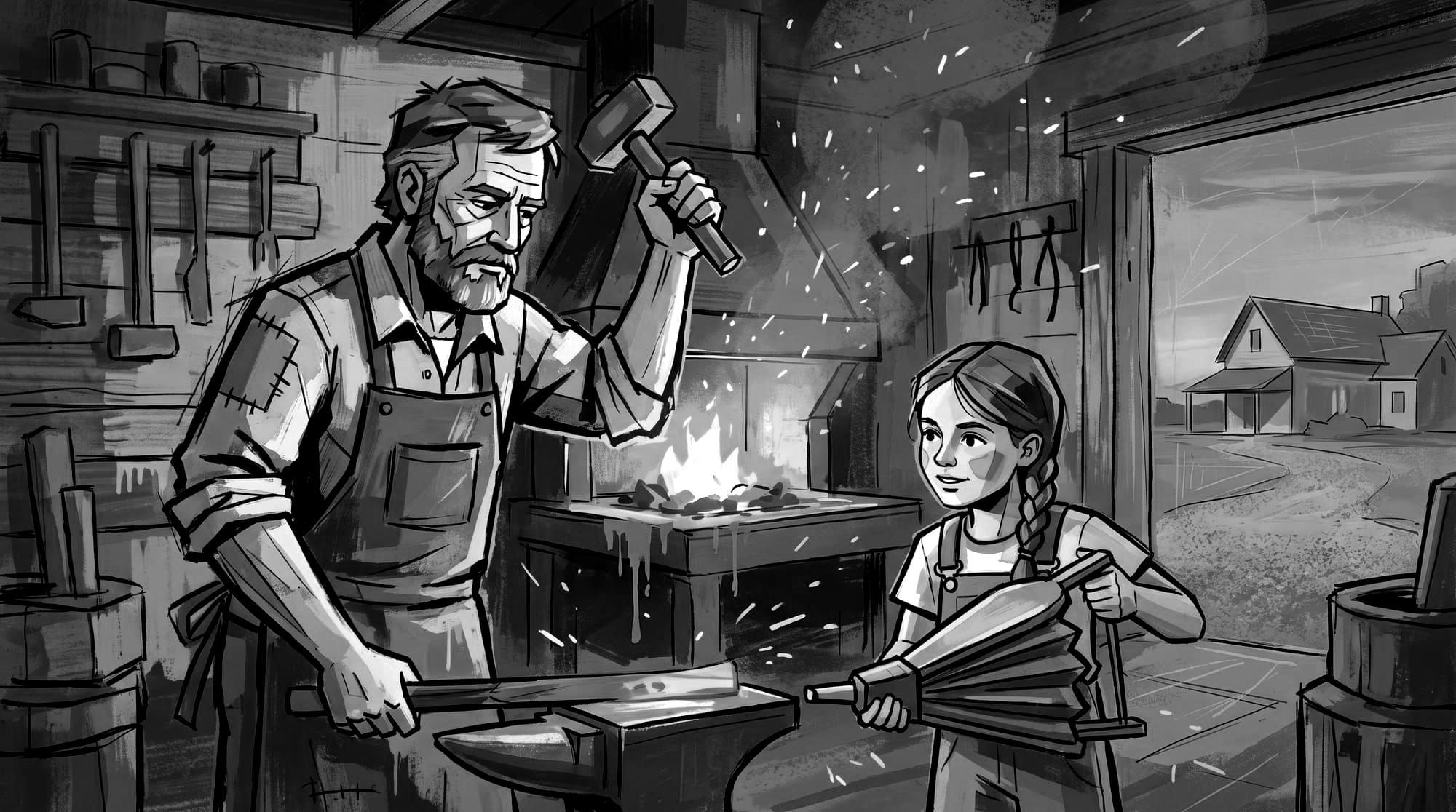
I made one picture with it: an old smith swinging a hammer, a girl working the
bellows beside him, evening sky through the open door. That picture ended up
being the opening shot of the finished video. It never got remade.
Everything else grew out of those two things.
Step by step, with the clock running
8:16 — Set up the project (2 minutes, automated)
A folder, a spreadsheet, some empty subfolders. Nothing interesting.
8:16 to 8:20 — The computer listened to the song (4 minutes, automated)
This is the first genuinely clever bit. The computer played the song to itself
and wrote down every word it heard, with the exact second each phrase started
and stopped. It found 39 sung phrases.
Then it chopped the song into pieces — but not evenly. It cut in the gaps
between sung phrases, so no clip starts or ends mid-word.
First attempt gave 17 chunks, averaging 13 seconds each. Too long and too few.
This song jumps across thirty years of a woman's life; it needs more cuts. So we
ran it again asking for shorter pieces and got 24 chunks averaging 9 seconds.
That second pass cost 2 minutes and made the whole video better.
There's one fussy detail that saves enormous pain later. The video model can
only make clips of certain exact lengths - you don't get to ask for "10 seconds"
and get 10 seconds. So the chopping was done using only lengths it can actually
produce. Sounds trivial. It means all 24 clips line up perfectly at the end instead of slowly sliding out of sync. More on that below.
8:20 to 8:30 — Writing the rules (10 minutes, automated)
The song has five people in it: the woman now, the woman as a girl, her father,
the woman at nineteen, and her own daughter. Each one got a written description
- hair, clothes, build - that gets copied word for word into every prompt they appear in.
That sounds obsessive. It isn't. If you let a computer describe the same woman 24 times, you get 24 slightly different women. Her jacket changes colour. Her hair gets longer. Copy the exact same words every time and she stays herself.
The same treatment went on the place. And one rule mattered more than all the
others:
The forge fire is lit in exactly three shots. Everywhere else the hearth is cold grey ash.
That's the whole song in one sentence.
The fire is alive in her memories and dead in her present.
Writing it down as a hard rule meant it couldn't quietly drift.
8:30 to 8:33 — Writing 11 picture prompts (3 minutes, automated)
Long, detailed descriptions of each starting picture, each one already carrying my style paragraph at the front and the locked character descriptions in the middle. I got them handed to me as a text file, ready to paste.
8:55 to 9:57 — My turn: making 11 pictures (61 minutes, manual)
This is the single biggest chunk of my time, and it's the fun part. Paste a prompt into the image generator, look at what comes back, keep it or run it again. Save it. Next.
An hour of work, and the only skill involved is knowing when a picture is right.
9:58 to 10:03 — Checking my work (5 minutes, automated)
All 12 pictures got checked against the rules. Right clothes? Right person? Is the fire lit in a shot where it should be dead? Is the truck in the driveway only in the shots where the truck belongs?
Ten passed. Two didn't:
The girl at the bellows had two plaits. The rules say one, over her right shoulder. My picture generator just ignored that.
The forge doorway was glowing orange in a present-day shot. Which meant
the fire looked lit. Which quietly contradicts the entire song.
That second one wasn't the generator's fault. The instruction it was given had
literally asked for a glowing doorway. Bad instruction, faithfully followed.
So the instruction got fixed *and* the underlying rule got tightened, so it couldn't come back later.
10:05 to 10:13 — My turn: two pictures again (8 minutes, manual)
Both came back right.
I kept one small flaw on purpose. The girl still looks older and taller than she should. But the forge memories span years of a childhood, so an older girl just
reads as time passing. Left it in.
10:13 to 10:26 — Writing 24 shot descriptions (13 minutes, automated)
For each clip: what moves, how fast, where it stops, who's singing which words.
One decision here shaped the whole video. In the memory scenes, nobody sings.
The woman sings in the present; the memories play silently underneath her voice,
mouths closed. Seventeen shots sing, seven don't, and the seven are silent
because I asked for silence — not because anything failed.
10:26 to 11:24 — The false start (57 minutes, wasted)
Pressed go. Watched the first clip take five minutes, then ten, then twenty.
After fifty minutes it still hadn't finished a single one.
The graphics card was reporting "100% busy" — but only drawing about a third of
the electricity it draws when it's really working. That's the tell. It wasn't computing. It was choking.
I'd asked for too big a picture. The card had 24GB of memory and the job needed
more, so it was shuffling data back and forth instead of doing the work. Like
trying to cook a big dinner on a tiny counter - you spend all your time moving
bowls around and nothing gets chopped.
Killed it. Dropped the picture size. That's the trade: slightly less sharp, but
it actually finishes.
11:25 to 12:40 — Making the 24 clips (75 minutes, automated)
Immediately obvious it was fixed. Same first clip that had been stuck for 50
minutes finished in under 4 minutes, and the card was pulling nearly four
times the power. It was finally doing the job instead of shuffling.
About 3 minutes per clip, 24 clips, done in an hour and a quarter. I went and
did other things.
12:41 to 12:52 — Two shots redone (11 minutes, automated)
I watched the first clip and the girl had three hands.
One on the bellows handle. One lower down. And a third that had no business
existing.
The cause was in the instructions. They said "both hands closed over the handle," and then asked her to pull the handle with both hands while keeping a hand steady. Asked to do two jobs with two hands and keep one still, the computer grew a third.
The fix was to stop being vague and give each hand its own job:
Her left hand stays closed around the lower bar and never moves. Her right hand alone rides the handle up and down.
The second clip had to be redone too. It carries on from where the first one ends, so it had inherited the extra hand. It had to be regenerated *after* the first one was fixed, using the corrected footage — otherwise it just copies the mistake back in.
Both came back clean.
12:52 to 12:55 - Sticking it together (3 minutes, automated)
All 24 clips end to end, the original song laid over the top.
And this is where the boring decision from 8:20 paid off. On my last video, the clips came out fractionally longer than asked for, so each one pushed the next one late. By the end the video ran eight seconds behind the song and lips were visibly out of time. Fixing that meant placing all 27 clips by hand.
This time every clip came out at exactly its planned length. All 24 just butt together. No hand-placing. No drift.
One last snag: the first attempt came out five frames short. Turned out the song
is a hair shorter than the video, and the stitching tool was trimming the video
to match the music. Tiny thing, took two minutes, fixed properly so it won't happen again.
Final file: 3 minutes 43 seconds, every frame present.
Where the time actually went
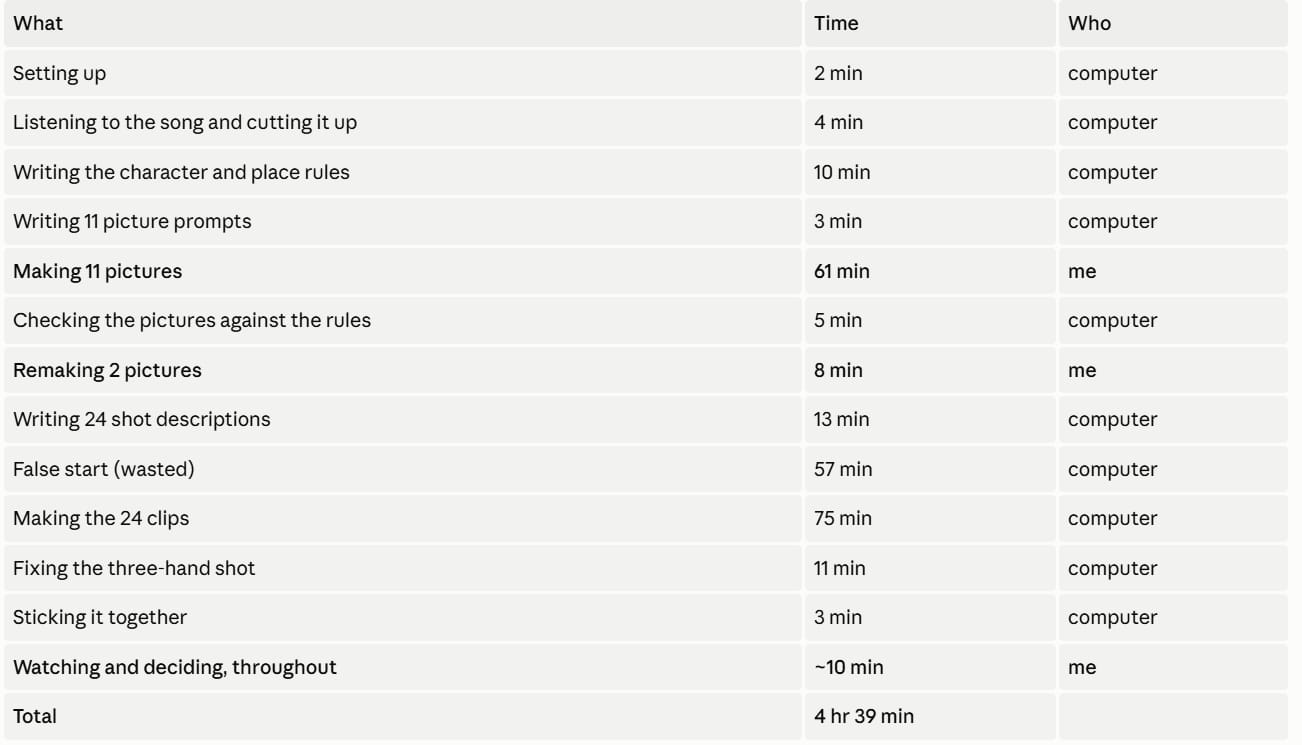
Me: about 1 hour 20 minutes. That's 30%.
Computer: about 3 hours 20 minutes. That's 70%.
Throw out the wasted 57 minutes and it's roughly 37% me, 63% computer but
false starts are part of real work, so I've left it in the headline number.
Worth saying: most of the computer's 70% is time I wasn't sitting there. I
started the hour-long render and went away. The only stretch where I was truly
pinned to the desk was the hour making pictures - and that's the hour I'd want
to keep anyway. That's the actual creative work.
What it cost
Under $1.50.
The expensive-sounding parts are free. Listening to the song and making all the
video happened on my own computer. The only money went on the writing - the
prompts and descriptions.
The four things I'd tell anyone trying this
1. Write your look down once, and never rewrite it. One paragraph
describing the style, pasted in front of every image. Same for every person and
every place. Every time you re-describe something, it changes a little. Twenty
small changes is a video that looks like four different videos.
2. Say what must be true, and what must not. My last video grew a porch
railing across five shots because the rules mentioned the word "rail" — mention
a thing enough times and it appears. This time the rules said the fire is dead
except in three specific shots, and it stayed dead.
3. Vague instructions grow extra limbs. Literally. "Both hands on the
handle" gave me a girl with three hands. Give every hand a job and a place and
the problem goes away.
4. When the machine says it's busy but isn't warm, it's not working.
Fifty minutes gone because "100% busy" looked like progress. The power reading is what gave it away. If it's not drawing the power, it's not doing the work.
What's left
Thsee clips were made at a fast, rough setting - good enough to watch all the way
through, not yet the finished thing. Ideally the next is running them through an upscaler to sharpen them up, and a colour pass.
But the video exists. It's watchable end to end. And it happened between breakfast and lunch.
Credits to the Pixaroma Discord Community
Ivo Tavris1 without whose EZ Installer tool I probably would not even be able to run ComfyUI
Ioan Docean aka Pixaroma for the basic ComfyUI workflow + the style used for the video from his list of styles.
Jeet Gajjar aka ASD who told me if you save a comfyUI workflow in API format, that json can be leveraged by ClaudeCode.
Julian Nicol aka Jules whose music videos originally inspired me to try the Mini Max H3 model, and who shared detailed notes and markdown files of how he automated his music videos with Claude.
Martin Albers aka Martificial who shared several tips on Minimax H3 and constantly encourages and inspires me.